Last month, I took on a task to refactor a legacy system with over 120 files. After two hours of using Cursor, I found it could only handle a few files at a time, lacking sufficient context. Switching to Claude Code made cross-module refactoring smooth, but writing new code without Tab completion felt counterproductive. I also tried Codex for batch PR submissions; out of five tasks, three PRs were decent, while two completely missed the mark.
In a week, I jumped between these three tools, akin to someone indecisively choosing between three restaurants.
After all this, I realized something: these three tools are not the same dish. Asking “which is better, Claude Code or Cursor” is like asking “which is better, a hammer or a screwdriver”—the question itself is flawed. They represent three entirely different design philosophies, addressing three distinct problems.
This article is a comprehensive review after six months of deep usage: which tool to use in which scenario, how to allocate budget, and how to combine them into a truly efficient workflow.
Quick Summary
I know many readers may not have the patience to read the entire article, so here are the conclusions upfront.
| Your Scenario | Recommended Tool | Reason (One Sentence) |
|---|---|---|
| Daily coding, seeking flow experience | Cursor | Tab completion + inline editing combo, currently unmatched. |
| Large refactoring, cross-file modifications | Claude Code | 200K context + direct file system manipulation, crushing advantages in refactoring scenarios. |
| Batch modifications, automatic PR submissions | Codex | Asynchronous parallel execution, submit 5 tasks and return to collect PRs. |
| Code review + technical research | Claude Code | Deep understanding of the entire project, connected with MCP to internal systems. |
| CI/CD pipeline integration | Claude Code | Terminal-native, naturally fits automation scenarios. |
| Budget of $20/month | Cursor Pro | Best overall experience as a single tool. |
| Budget of $120/month, seeking extreme efficiency | Cursor Pro + Claude Code Max | Golden combination, covering 90% of scenarios. |
If you want just one sentence: Cursor is the hand, Claude Code is the brain, Codex is the legs. Below, I will elaborate on why.
Three Philosophies, Three Paths
Before comparing functionalities, we need to clarify what each of these tools bets on—they have fundamentally different views on “the future form of AI programming”.
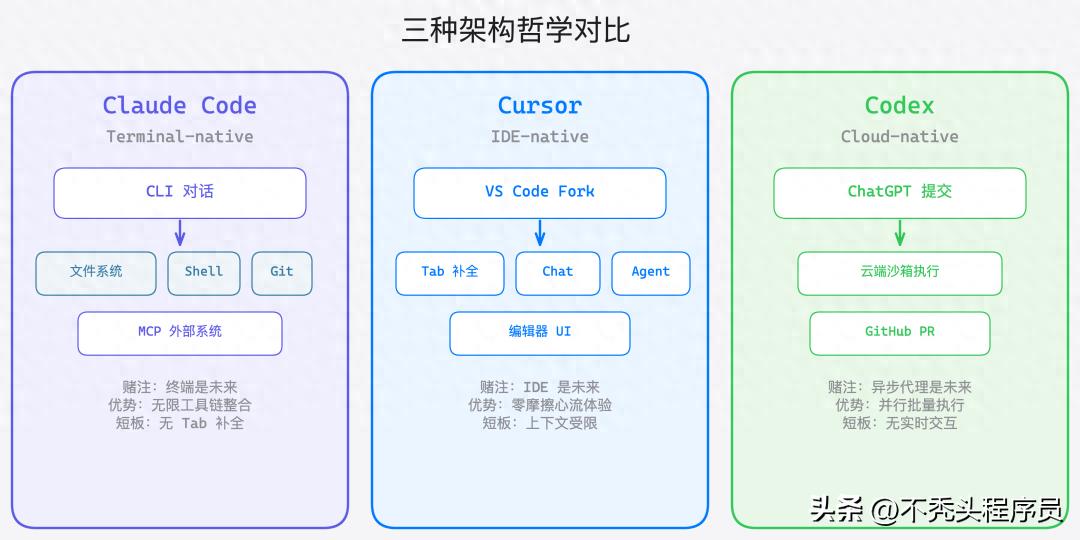
Claude Code: The Terminal is My IDE
Anthropic made a bold judgment—developers will not need an IDE in the future; a terminal is sufficient.
Claude Code is a pure Terminal CLI tool, not tied to any editor. You interact with it in the terminal, and it directly reads and writes your file system, executes shell commands, runs tests, and manipulates git. This design brings several capabilities that other tools cannot achieve:
- Unlimited Toolchain Integration: Connects GitLab, Jira, databases, logging systems, and any internal API through MCP (Model Context Protocol).
- Hooks System: Automatically executes lint, format, and tests before and after code generation to ensure output quality.
- Skills Module: Reusable capability packages shared among teams for best practices.
- Sub-agent Parallelism: Breaks down complex tasks for multiple agents to work simultaneously.
The current version v2.1.x, coupled with the Opus 4.6 model, has a 200K token context window. Honestly, the learning curve is steep—you need to get used to the terminal workflow, write good prompts, and understand MCP configuration. But once you get past this hurdle, the efficiency in handling complex engineering tasks is genuinely high.
Cursor: Making IDE Smarter, Not Replacing It
Cursor’s stance is the opposite—developers cannot live without an IDE, so AI should be embedded within the IDE.
It is essentially a deep fork of VS Code, with all AI capabilities functioning within the editor. The Tab smart completion can predict your next line or even the next segment of code, while Cmd+K inline editing allows you to describe modification intentions in natural language. The Chat sidebar provides context-aware dialogue, and the Agent mode can autonomously plan and execute multi-step tasks.
Cursor’s core advantage is zero friction—VS Code users can almost immediately start using it without learning, as all interactions occur in their most familiar editor. The projected ARR of over $100M in 2025 and millions of active developers is not without reason.
It also supports multi-model switching (GPT-4o, Claude series, Gemini), not betting on a single model. The .cursorrules file allows you to customize project-level instructions, ensuring unified AI behavior within the team.
Codex: I Won’t Write Code for You, But I’ll Help You Get Things Done in Bulk
OpenAI’s new version of Codex, launched in May 2025 (note that this is not the retired code completion API from 2021), took a third path—an asynchronous cloud agent.
You submit a coding task in ChatGPT, and Codex independently executes it in a cloud sandbox: reading code, installing dependencies, modifying files, running tests, generating diffs, and finally creating GitHub PRs. You can do other things while this process runs, and you receive a notification when it’s done.
The core model codex-1 is an optimized version based on o3, with SWE-bench Verified claiming around 72% effectiveness. Its biggest advantage is parallelism—you can submit multiple tasks simultaneously, running five refactoring tasks in parallel, which is not possible with Claude Code or Cursor.
However, the trade-off is significant: no real-time interaction, cannot write and debug simultaneously, relies on the cloud, and the full functionality requires $200/month for ChatGPT Pro.
Essential Differences Among the Three
| Dimension | Claude Code | Cursor | Codex |
|---|---|---|---|
| Design Bet | Terminal is the future | IDE is the future | Asynchronous agent is the future |
| Interaction Mode | Dialogue + Commands | Embedded + Completion | Asynchronous Delegation |
| User Mindset | AI coding partner | Smarter IDE | Asynchronous coding assistant |
| Code Execution | Local direct execution | Does not execute directly | Cloud sandbox |
| Learning Curve | Steep | Gentle | Moderate |
| IDE Binding | None | VS Code bound | None (bound to ChatGPT) |
This is not a matter of good or bad; it’s about applicable scenarios. Next, let’s break down each battlefield.
Direct Confrontation: Six Battlefields
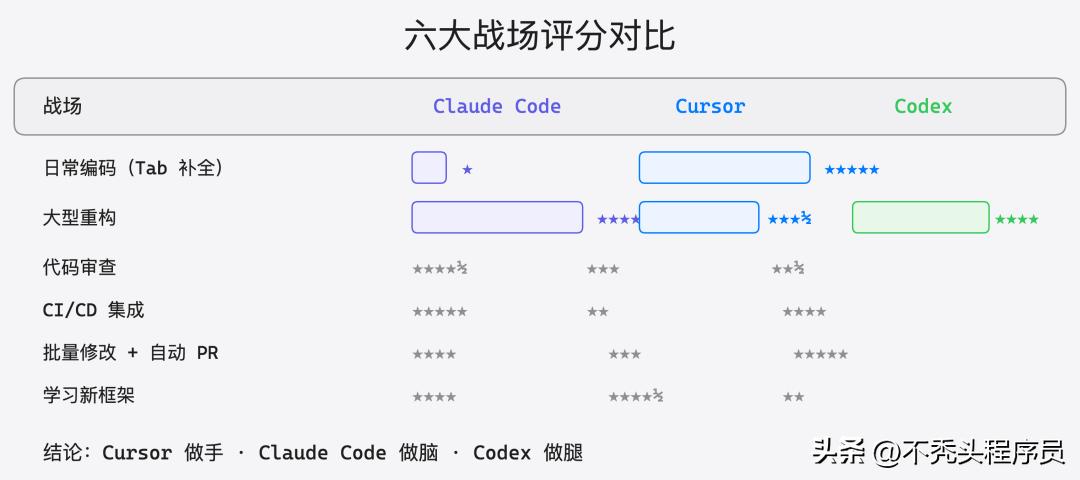
Battlefield One: Daily Coding (Tab Completion + Inline Editing)
Cursor 5 points | Claude Code 1 point | Codex 0 points
In this scenario, there is no contest; Cursor wins hands down.
Cursor’s Tab completion provides the closest experience to “mind reading” in coding. When you finish a function signature, it can predict the entire function body; when you finish an if statement, it can complete the else branch. It’s not just simple code snippet matching but reasoning based on the entire project context.
// You just wrote the function signature
func (s *OrderService) CreateOrder(ctx context.Context, req *CreateOrderReq) (*Order, error) {
    // Cursor auto-completes: includes parameter validation, inventory check, transaction handling, event publishing
    // Moreover, it has read the writing styles of other Services in your project, ensuring consistency.
}
Combined with Cmd+K inline editing, if you select a piece of code and input “add timeout control and retry logic,” it directly modifies it in place, previewing the diff for confirmation before applying with one click. The entire process does not require leaving the editor or switching windows, maintaining the flow state.
Claude Code is nearly unusable in this scenario—it lacks built-in Tab completion, requiring you to describe what code you want to write in the terminal, leading to lower efficiency. Writing a few lines of code turns into a conversation.
Codex, needless to say, is asynchronous; you cannot submit a cloud task just to complete a single line of code.
Battlefield Two: Large Refactoring (Cross-file Modifications + Context Understanding)
Claude Code 5 points | Codex 4 points | Cursor 3.5 points
The tables turn in large refactoring scenarios, where Claude Code’s advantages become apparent.
In that 120-file refactoring task last month, I needed to extract the order module from a monolithic service into an independent microservice. This involved changes in interface definitions, dependency adjustments, configuration file modifications, and synchronizing test cases.
Claude Code’s approach: I clearly describe the requirements, and it first scans the entire project structure to understand the dependencies between modules, then formulates a refactoring plan and executes it step by step. The 200K token context window means it can simultaneously “see” many related files. More importantly, it can run tests to verify that the refactoring does not break existing functionality.
# Typical refactoring workflow in Claude Code
> Help me extract the order module from the monolith into an independent service, requiring:
> 1. Extract order-related domain layers to a new module
> 2. Change direct calls to Dubbo RPC
> 3. Synchronize all affected tests
> 4. Run a complete test to confirm no breaks

# Claude Code will: read project structure → analyze dependencies → create new module → modify files one by one → run tests → report results
Cursor can also be used in this scenario; its Agent mode supports multi-file editing. However, its context may falter when handling a large number of files, sometimes forgetting to synchronize references in other files. It works well for refactoring within 10-20 files, but beyond that scale, it struggles.
Codex is suitable for “patternized” refactoring—like changing log4j to logback across the entire project or batch-adding tracing headers to all APIs. These tasks are fixed in pattern and have low coupling between files, allowing Codex to execute safely in the sandbox and automatically submit PRs. But for complex architectural refactoring involving intricate business logic, its depth of understanding is insufficient.
Battlefield Three: Code Review
Claude Code 4.5 points | Cursor 3 points | Codex 2.5 points
I believe code review is a severely underrated scenario for Claude Code.
By connecting to GitLab via MCP, I can have Claude Code pull the diff of MR directly and review it in the context of the entire project. It does not just check syntax and style; it can understand business logic issues—like “this concurrency control logic has an ABA problem under high concurrency” or “there’s a lack of idempotency checks, which could lead to data inconsistency on repeated requests.”
# Reviewing a GitLab MR with Claude Code
> Help me review GitLab MR #1234, focusing on:
> 1. Concurrency safety
> 2. Completeness of error handling
> 3. Performance pitfalls
> 4. Consistency with existing code style
The hooks system can also automate the review process—every time a new MR is created, Claude Code automatically reviews it, writing results back to GitLab comments. After promoting this in the team, the efficiency of manual reviews has significantly improved, as AI filters out low-level issues.
Cursor’s Chat feature can also perform reviews, but it can only see the currently opened file and cannot directly read MR diffs and associated contexts. You have to manually paste the code, which is cumbersome.
Codex can perform reviews, but its strength lies in “modifying code” rather than “evaluating code,” and the depth and insight of its review results are not as strong as Claude Code’s.
Battlefield Four: CI/CD Integration
Claude Code 5 points | Codex 4 points | Cursor 2 points
Claude Code is terminal-native, making integration into CI/CD pipelines almost zero-cost.
Our team integrated Claude Code into GitLab CI, achieving several automation processes: automatic MR reviews, automatic lint error fixes, automatic changelog generation, and automatically completing missing unit tests. All of these were configured through Hooks and MCP without needing to write extra glue code.
Codex also has a place in CI/CD scenarios—it’s deeply integrated with GitHub, allowing it to automatically handle certain tasks in CI processes. However, it relies on the cloud; if your CI environment has network restrictions or security compliance requirements, it can be awkward.
Cursor is basically unsuitable for this scenario—it is a desktop IDE application, not designed for headless environments. Although it theoretically can run in CLI mode, that is not its strength.
Battlefield Five: Batch Modifications + Automatic PRs
Codex 5 points | Claude Code 4 points | Cursor 3 points
This is Codex’s stronghold.
Scenario: You need to uniformly upgrade a dependency version across 30 microservices while updating corresponding configuration files and tests. If you do it manually one by one, plus submitting MRs, waiting for reviews, and merging, it could take all day.
Codex’s approach: Submit 30 tasks simultaneously, each executing in an independent sandbox, running tests to confirm everything is fine before automatically creating PRs. You can do other things and return half an hour later to collect 30 PRs. Of course, you still need to manually review them, but the efficiency improvement from “modifying code” to “reviewing code” is exponential.
Claude Code can also handle batch modifications, and its sub-agents can execute multiple tasks in parallel. However, it executes locally, and the degree of parallelism is limited by your machine’s resources. Additionally, each task requires API calls, quickly consuming tokens.
Cursor’s Agent mode can handle multi-file modifications, but it is synchronous and single-task; for 30 services, you have to do them one by one.
Battlefield Six: Learning New Frameworks + Technical Research
Cursor 4.5 points | Claude Code 4 points | Codex 2 points
When learning new things, Cursor and Claude Code each have their advantages.
Cursor’s advantage lies in learning while practicing—you open a sample project of a new framework in the editor, and the Chat sidebar allows you to ask questions anytime, while Tab completion provides correct code suggestions based on the framework’s API style. Learning and practice occur simultaneously, resulting in a very short feedback loop.
Claude Code’s advantage is deep understanding—you can have it read through the source code of an open-source project and explain the architectural design and core processes. Through the extended thinking mode, it provides high-quality explanations of complex concepts. When I was learning the microkernel architecture of the DLM framework, I had Claude Code scan the entire codebase and explain the execution chain step by step.
Codex has limited utility in this scenario; it is more suited for “doing tasks” rather than “learning.” You can have it modify code, but asking it why a design is structured that way is less effective.
Economic Analysis: Who’s Worth Your Money?
Discussing tool selection without considering costs is misleading. The monthly fee is just the tip of the iceberg; the real costs include token consumption rates, the time value gained from efficiency improvements, and the hidden costs of the learning curve.
Pricing Comparison Table
| Plan | Claude Code | Cursor | OpenAI Codex |
|---|---|---|---|
| Free | No independent free tier | 2000 completions/month + 50 slow requests | ChatGPT free version does not include |
| Entry $20/month | Pro (with strict rate limits) | Pro (500 fast requests + unlimited slow) | Plus (limited access) |
| Advanced | Max $100/month | Business $40/user/month | Pro $200/month |
| Token Billing | Max includes substantial Opus usage | Based on request count, not on tokens | Based on asynchronous task quotas |
Real TCO Quick Calculation
Assuming you are a mid to senior developer coding for 4 hours a day, using AI tools for about 2 hours, and working 22 days a month.
| Plan | Monthly Fee | User Experience | Estimated Efficiency Gain | Cost per Hour of Efficiency Gain |
|---|---|---|---|---|
| Cursor Pro | $20 | Smooth daily coding, limited for complex tasks | ~30-40% | $0.45/hour |
| Claude Code Pro | $20 | Frequent rate limits, fragmented experience | ~15-25% | $0.90/hour |
| Claude Code Max | $100 | Strong for complex tasks, lacks Tab completion | ~35-50% | $2.27/hour |
| Cursor Pro + Claude Code Max | $120 | Complementary combination covering all scenarios | ~50-70% | $1.71/hour |
| Cursor Pro + Codex Pro | $220 | Synchronous + asynchronous full coverage | ~45-60% | $3.67/hour |
| Full Package | $320 | Theoretically optimal but diminishing returns | ~55-75% | $4.27/hour |
Note a pitfall: The rate limits of Claude Code Pro are genuinely tight. I found that for a moderately complex refactoring task, I would hit the limit in about half an hour. If you plan to use it seriously, Max is essential. Pro is only suitable for occasional use.
Recommended Plans for Different Budgets
| Monthly Budget | Recommendation |
|---|---|
| $20 (Students/Independent Developers) | Cursor Pro. Best overall experience as a single tool; Tab completion + Chat + Agent covers the most common scenarios. Claude Code and Codex’s $20 tiers have significant limitations and are not recommended as sole tools. |
| $100 (Individual Developers/Small Teams) | Claude Code Max. If you are a heavy terminal user, you can manage daily coding with Cursor’s free version’s 2000 completions, while complex tasks are handled by Claude Code. |
| $120 (Professional Developers) | Cursor Pro + Claude Code Max. This is my current plan and what I consider the sweet spot. Use Cursor’s Tab completion for daily coding to maintain flow, and switch to Claude Code for complex tasks. The complementarity of their capabilities is very high. |
| $200+ (Teams/Enterprises) | Consider adding Codex on top of the above, used for batch automation tasks. But ensure your team has enough batch modification scenarios; otherwise, the $200/month for ChatGPT Pro is not cost-effective. |
Trinity: Combining Tools is the Ultimate Answer
Instead of getting caught up in “which one to choose,” it’s better to think about “how to combine them.”
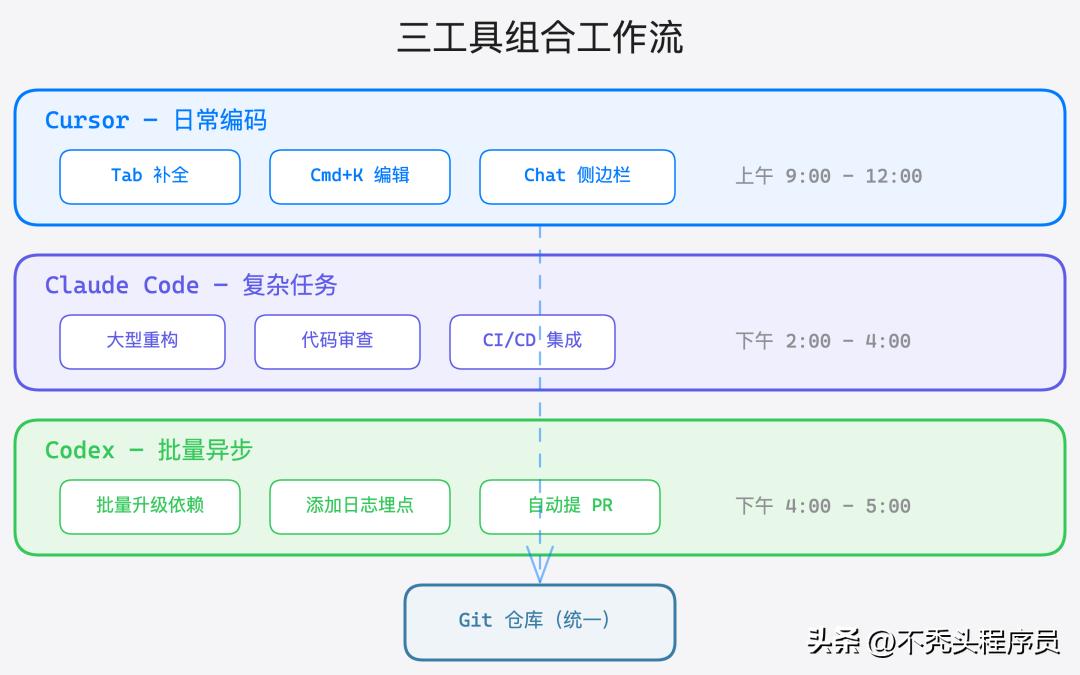
Actual Workflow Breakdown
In a typical workday, my tool switching looks something like this:
9:00 AM - 12:00 PM (New Feature Development): Open Cursor, quickly write code using Tab completion + inline editing. If uncertain about an API usage, I directly ask in the Chat sidebar. For small-scale multi-file modifications, I use Agent mode. During this time, Cursor is the absolute main tool.
2:00 PM - 4:00 PM (Complex Tasks): Switch to Claude Code to handle refactoring, troubleshoot strange bugs, and review colleagues’ MRs. Claude Code’s understanding of the project’s global context gives it a clear advantage in these tasks. Sometimes I need to read logs to analyze issues, and MCP connects directly to the logging system, avoiding the need to switch between multiple tools.
4:00 PM - 5:00 PM (Batch Tasks): Submit accumulated batch modification tasks to Codex—uniformly upgrade dependencies, batch-add logging points, and add missing parameter checks to a batch of APIs. After submitting, I work on documentation or attend meetings, returning the next day to collect PRs.
Key Configuration Suggestions
To enable the three tools to work together effectively, here are some practical tips:
- Unified Git Workflow: All three tools operate around a Git repository. Ensure that .cursorrules (Cursor’s project-level instructions) and CLAUDE.md (Claude Code’s project context) are consistent to avoid generating code with conflicting styles.
- Claude Code’s Hooks for Quality Assurance: Regardless of whether the code is written by Cursor or submitted by Codex, Claude Code’s pre-commit hook should run lint + format + tests to ensure the baseline code quality.
- Codex PRs Must Be Manually Reviewed: The quality of PRs generated by Codex can vary significantly; sometimes they are ready to use, while other times they require extensive modifications. It is advisable to let Claude Code perform the first round of automated reviews, followed by a manual final review.
Outlook for the Second Half of 2026
The competition among AI programming tools has just entered a heated phase. Based on the current trends, several developments are worth noting.
| Trend | Specific Prediction | Impact on Tool Selection |
|---|---|---|
| Acceleration of Agentization | All three are moving towards more autonomous agent modes, with “human approval + AI execution” becoming mainstream. Asynchronous execution capabilities are becoming standard, and Codex’s first-mover advantage may be equalized. | |
| Expansion of Context Windows | 1M+ tokens will become standard, eliminating bottlenecks in understanding long codebases. Claude Code’s current advantage of a 200K context will be diluted. | |
| Blurring of Tool Boundaries | Cursor has launched Background Agent (similar to Codex’s asynchronous mode), and Claude Code may introduce a VS Code plugin. The necessity for “combined use” may decrease, but in the short term, it remains the optimal strategy. | |
| Rise of Local Models | Open-source models like Llama 4 and Qwen 3 are approaching the coding capabilities of closed-source models. A new combination may emerge: “local free models for daily completion + cloud advanced models for complex tasks.” | |
| Competition for Enterprise Market | Security compliance, private deployment, and audit logs are becoming decisive factors. Claude Code’s MCP ecosystem and Cursor’s Business plan will increase investment in enterprise features. | |
| Intensification of IDE Wars | Windsurf, JetBrains AI, and GitHub Copilot Workspace continue to enter the market. Increased competition may force price reductions, which is good for users. |
My judgment: In the second half of 2026, the functional boundaries among the three will begin to blur—Cursor will enhance asynchronous and terminal capabilities, Claude Code may launch lighter editor integrations, and Codex will add real-time interaction modes. However, in the short term (the next 6-12 months), the core differentiations among the three remain significant, and combined use continues to be the optimal solution.
Frequently Asked Questions
Q1: I am a JetBrains user (IntelliJ/GoLand), can I use Cursor?
Not directly. Cursor is a fork of VS Code; JetBrains users must either switch to Cursor or use GitHub Copilot / JetBrains AI in JetBrains, alongside Claude Code for complex tasks. Many JetBrains users I know use JetBrains as their main editor and Claude Code as their AI assistant, skipping Cursor.
Q2: What is the difference between Claude Code Pro and Max?
The difference is substantial—so much so that they can be considered two different products. The rate limits of Pro mean that for a moderately complex task (like refactoring 3-5 files), you will hit the limit in about half an hour, and then you have to wait for cooldown. If you plan to use Claude Code seriously as one of your main tools, Max is essential. Pro is only suitable for occasional use.
Q3: What is the relationship between the new Codex and GitHub Copilot?
They are entirely different products. The old Codex from 2021 was the underlying model for Copilot (a fine-tuned version of GPT-3) and has been retired in 2023. The new Codex from 2025 is an autonomous programming agent within ChatGPT, using the o3-derived model codex-1, and is parallel to Copilot. Copilot provides real-time completion, while Codex handles asynchronous tasks, targeting different needs.
Q4: Can the SWE-bench score represent real effectiveness?
Its reference value is limited. SWE-bench tests the ability to “fix known GitHub issues,” but real development often involves implementing new requirements and understanding complex contexts. Basic benchmarks like HumanEval have saturated (with all companies achieving 90%+), showing low differentiation. Real engineering efficiency depends more on context understanding depth, tool integration capabilities, interaction latency, and error recovery ability. A tool with a slightly lower SWE-bench score but a good interaction experience may actually be more efficient in practice.
Q5: Is it better for a team to use one tool or allow everyone to choose?
It depends on the team size. For small teams of fewer than 10 people, allowing each person to choose their preferred tool is fine, ensuring code quality consistency through Git standards and CI/CD. For teams of over 50, it’s advisable to unify the main tool (usually Cursor Business, as it has the most complete management features) while allowing individuals to use Claude Code for complex tasks. The key is to unify code quality standards, not necessarily the tools.
Comments
Discussion is powered by Giscus (GitHub Discussions). Add
repo,repoID,category, andcategoryIDunder[params.comments.giscus]inhugo.tomlusing the values from the Giscus setup tool.